Data Gateway: ODBC bridge for SQL Server, Java, Linux and Mac
Install once on any server. All client apps connect to it — no ODBC on every machine, credentials stay on the host.
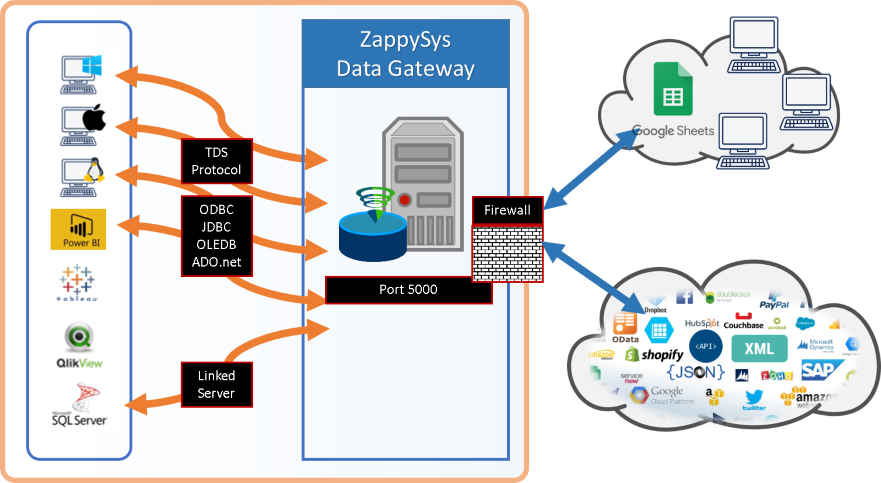
A fast bridge from SQL Server, Java apps and Linux / Mac clients to ZappySys and other ODBC drivers. Connect with any SQL Server driver (ODBC, JDBC, OLEDB or ADO.NET) over the TDS protocol, with no driver install on the client.
Part of ODBC PowerPack
- Any ODBC-compliant tool
- Runs in your environment
- SQL Server via Data Gateway
- 32-bit and 64-bit


At a glance
What the Data Gateway can do
Install once on any server. All client apps connect to it — no ODBC on every machine, credentials stay on the host.
A bridge for SQL Server
Query ZappySys drivers from T-SQL through a linked server or OPENQUERY, inside views, functions and stored procedures.
- REST API, JSON, XML, CSV and Salesforce from T-SQL
- No ETL step outside SQL Server
- Works with SQL Server 2012 through 2025 (32/64 bit)
Any SQL Server compatible client
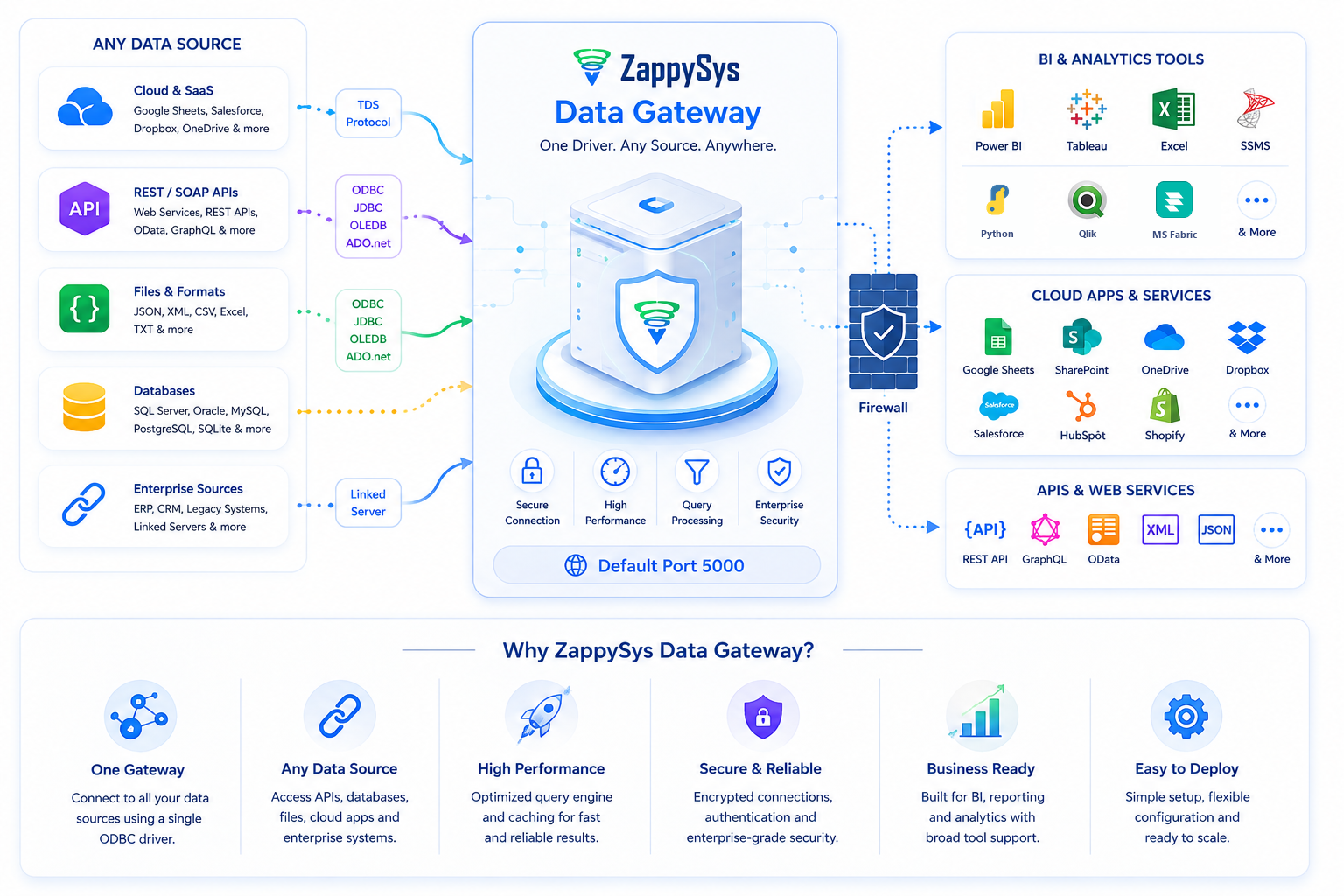
The gateway speaks TDS, like SQL Server. Connect with SQL Server ODBC, OLEDB, ADO.NET or JDBC drivers.
- Java apps through JDBC
- Google Sheets
- Any TDS compatible tool
Windows, Linux and Mac clients
Apps on any operating system connect to the gateway without installing a driver on the client machine.
- No ODBC driver on every laptop
- Clients on Windows, Linux or macOS
- One install on the gateway host
Several data sources
Create multiple data sources on the gateway and bind each to an existing ODBC DSN on the machine.
- One data source per DSN
- Mix ZappySys and other ODBC drivers
- Manage them in one place
Run it where you want
Install the gateway on-premises, or on a cloud VM that is reachable from your clients. Many users can share one central gateway.
- On-premises or cloud VM
- One central host, many users
- You choose the machine
Credentials stay on the gateway host
Client apps use a SQL Server compatible driver. API keys, OAuth tokens and DSNs stay on the gateway host instead of every machine.
- Keys and tokens stay put
- No local ZappySys install for analysts
- Central place to update settings
Works with the tools you have
Any ODBC-compliant tool can use the DSN: Power BI, Tableau, Qlik, SSRS, Informatica, Excel and SSIS.
- Create a DSN once, reuse it everywhere
- 32-bit and 64-bit ODBC
- Stored in the standard ODBC Data Source Administrator
See all features
- Allows to create multiple data sources which can be bound to existing ODBC DSN on the machine
- Access ZappySys drives from JAVA apps (via JDBC) or from Google Sheet
- Gateway use TDS Protocol which is widely used by many SQL Server / Sybase compatible drivers
- Apps from any platform (e.g. Windows, Linux, Mac) can connect to Gateway without actually installing driver on the client machine
- Read other use cases for Data Gateway
SQL Server 2012–2025
Ways to use it
Pick how you reach your data.
Configure the DSN once, then query it from any ODBC tool or from SQL Server.
Use drivers inside T-SQL.
Create a linked server that points at the gateway, then call OPENQUERY from SSMS, views, functions and stored procedures.
- Linked server and OPENQUERY
- REST API, JSON, XML, CSV, Salesforce
- No driver on SQL Server
Connect Java apps through JDBC.
Use a SQL Server JDBC driver against the gateway to read ZappySys data sources from Java.
- Any SQL Server JDBC driver
- Works on Windows, Linux and macOS
- Same SQL as in the driver UI
Power BI, Excel, Google Sheets and more.
Any client that can use a SQL Server compatible driver can query the gateway.
- ODBC, OLEDB, ADO.NET, JDBC
- Google Sheets
- Linux and Mac apps
Inside the UI
The driver UI, step by step.
Real screens from the ZappySys ODBC driver configuration.
How the Data Gateway fits
Client apps connect to one gateway service with a SQL Server compatible driver; the ZappySys drivers run on the gateway host.
T-SQL example
Call a ZappySys driver from T-SQL.
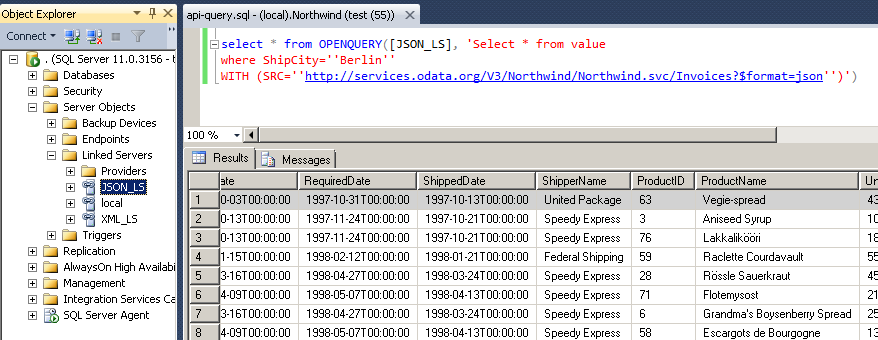
Add the Data Gateway as a linked server in SQL Server, then use OPENQUERY to run a driver query inside your own T-SQL, views, functions and stored procedures. The linked server name below is an example.
-
Data source on the gateway
A Data Gateway data source bound to an ODBC DSN, such as a ZappySys JSON Driver DSN.
Data source : MyJsonSource Bound to : ZappySys JSON Driver (ODBC DSN) SQL Server : linked server [ZappyGateway] -> Data Gateway -
Run the T-SQL query
T-SQL
SELECT * FROM OPENQUERY([ZappyGateway], 'SELECT * FROM value WITH (SRC=''https://services.odata.org/V3/Northwind/Northwind.svc/Invoices?$format=json'')')The inner statement is a normal driver query. The outer
OPENQUERYsends it through the gateway.No driver on SQL Server: the driver is installed only on the gateway machine.
-
Rows returned to SQL Server
Result One row per record returned by the driver query Insert the rows into a table, join them with local tables or return them from a stored procedure.
Illustrative setup. Step-by-step instructions are in the SQL Server tutorial.
Articles
Guides and tutorials for the Data Gateway
Compatibility and requirements
Built for Windows, and for your own environment.
- Windows 11, 10, 8 and 7, and Windows Server 2022, 2019, 2016, 2012 R2 and 2008
- .NET Framework 4.x. The JDBC Bridge Driver also needs Java 8 or later
- 32-bit and 64-bit ODBC drivers. SQL Server 2012 through 2025 through the Data Gateway
- Self-hosted: drivers run in your Windows process, business data does not pass through ZappySys servers, and credentials stay in your DSN
- Free trial of ODBC PowerPack: test with your own data before you buy
FAQ
Questions about the Data Gateway
Which clients can connect to the Data Gateway?
Any client with a SQL Server compatible driver: SQL Server ODBC, OLEDB, ADO.NET or JDBC drivers, or a linked server in SQL Server. The gateway uses the TDS protocol.
Do I need to install the ZappySys driver on the client?
No. The drivers run on the gateway host. Clients on Windows, Linux or macOS only need a SQL Server compatible driver.
Where can the Data Gateway run?
On-premises, or on a cloud VM that your clients can reach. One central gateway can serve many users.
Can Java apps and Google Sheets use it?
Yes. Java apps connect through JDBC, and Google Sheets can query the gateway as well.
Which SQL Server and Windows versions are supported?
Support for SQL Server 2025, 2022, 2019, 2017, 2016, 2014 and 2012 (32/64 bit) through the Data Gateway. See the system requirements.
Can I try it before buying?
Yes. Download ODBC PowerPack, set up a data source on the gateway and test your own data before you buy.
Related drivers
Pair it with the rest of ODBC PowerPack.
 JSON / REST API DriverQuery JSON files and REST APIs with SQL, OAuth, pagination, and streaming for la
 XML / SOAP API DriverRead XML files and SOAP web services with XPath filters and familiar SQL.
 CSV / REST API DriverQuery CSV and flat files from disk or HTTP endpoints using SQL.
 Salesforce DriverQuery and write Salesforce objects with SOQL-friendly SQL over ODBC.
 Amazon S3 Driver for CSV FilesQuery CSV objects stored in Amazon S3 buckets.
What customers say
Start your free trial today
Install ODBC PowerPack and add a Data Gateway DSN.
Preview your data in the driver UI before you connect your tool.
- One DSN, many toolsPower BI, Excel, SSIS, Python and SQL Server can all use it.
- Free trialTest the driver with your own data before you buy.
- Live supportHelp during your trial and after purchase.
Open Help FileBrowse all ODBC PowerPack drivers
New purchases may be eligible for refund review within 30 days. See the refund policy.
Talk to an engineer before or during your trial.